Property · Click a point
Select a New Zealand property boundary for terrain analysis
This property boundary map loads the legal parcel under your click from the LINZ cadastre, anywhere in New Zealand, and uses it as the analysis area for every other tool. Contours, slope, drainage, winter sun and the property report are then clipped to the title rather than a rectangle drawn by eye.
It is the starting point for most jobs on this site: find the section by address or appellation, select it, then pick the question you want answered.
Free to run · pay to download
Free to run, and free to save as a PNG image of the map. This tool has no file export of its own. For the terrain as a file, Download Data exports contours, a GeoTIFF or a 3D mesh with a pass: NZ$49 for 7 days or NZ$299 for 12 months.
Who uses this
- Buyers. Measure the block they are actually buying, not the paddock next door.
- Architects and designers. Start a site analysis from the real boundary and appellation.
- Real estate agents. Pull terrain facts for a listing parcel in a couple of clicks.
When to use it
- You want contours, slope, sunlight or drainage clipped to a title rather than a rectangle drawn by eye.
- You are comparing several properties and want each one measured on the same footing.
- You need the parcel appellation, area and title reference alongside the terrain.
Which tool for your job
Property is one step in a bigger question. These are the jobs it helps with, and the tools that go with it.
If you’re working on buying a section or lifestyle block
What is the ground like, and how does it compare with the others on my list?
- 1.Property (this tool) — Selects the legal parcel so every other tool is clipped to the boundary.
- 2.Property Report — A PDF with contours, slope, aspect, winter sun, drainage and elevation for that one parcel.
- 3.Saved Properties — Up to five places side by side: elevation, slope, winter sun and drainage.
- 4.Water & Drainage — Where water will run and pond across the block in heavy rain.
How to use it
- Open Property and zoom in until parcel outlines appear on the map.
- Click inside the parcel. The boundary is fetched and drawn as the analysis area.
- Search an address or appellation in the top bar to jump straight to a parcel instead of clicking.
- Switch to any area tool. Its results are clipped to the parcel until you clear or redraw the area.
Step by step: Mt Iron, Wānaka
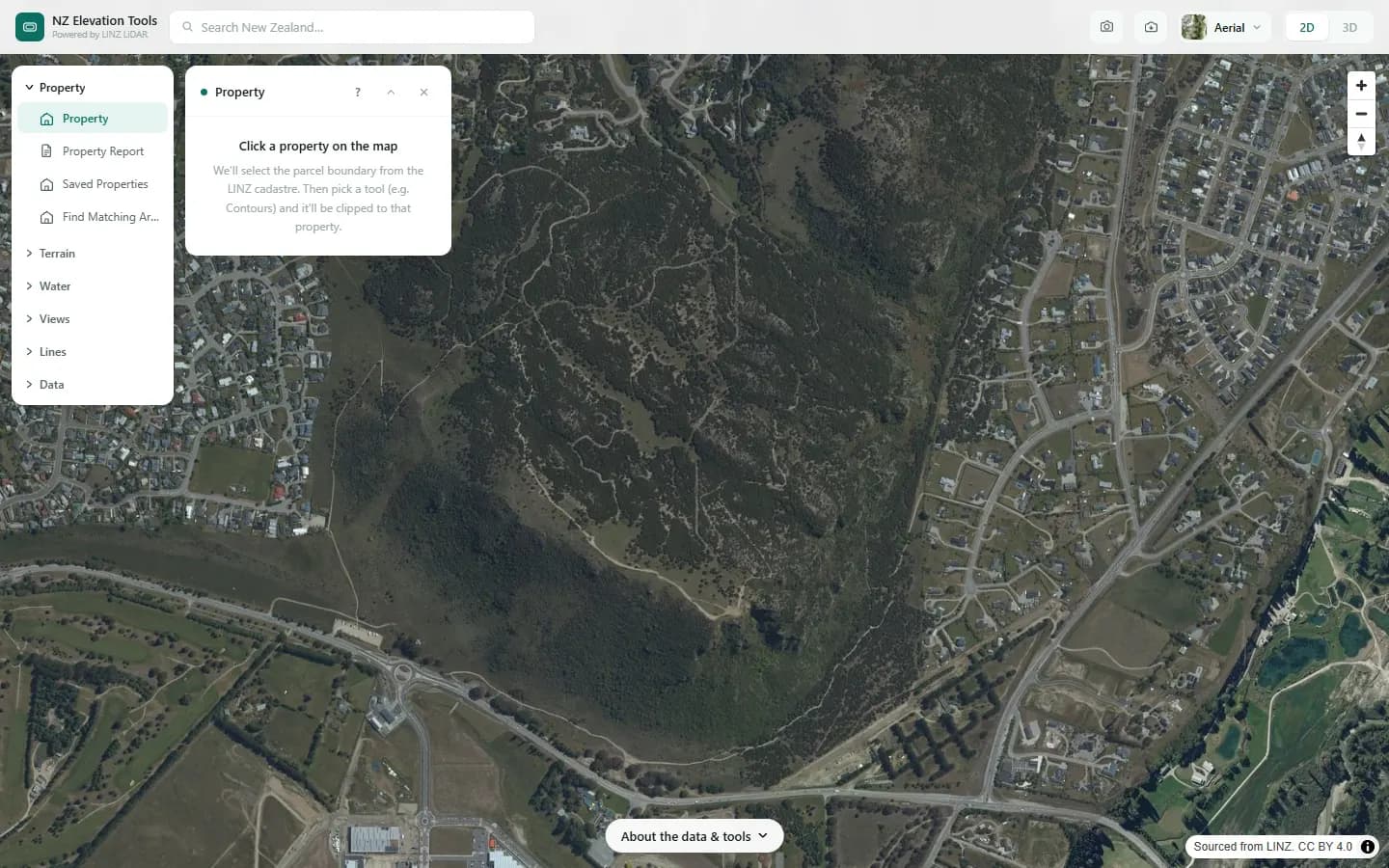
We select the Mt Iron recreation reserve, a 67 ha parcel on the eastern edge of Wānaka, so that later tools measure only the reserve.
What it showed
- The boundary follows the surveyed parcel, which here includes a long strip along the road that you would never draw by eye.
- Switch to Slope, Sunlight or Water & Drainage next. Each one is clipped to this outline until you clear it.
Screenshots from NZ Elevation Tools. Aerial imagery from LINZ Basemaps. Sourced from the LINZ Data Service and licensed by Environment Southland, Otago Regional Council and Queenstown-Lakes District Council for re-use under the Creative Commons Attribution 4.0 International licence.
How it works
The click is sent to the LINZ cadastral service, which returns the parcel polygon and its attributes. Where a live title is available the title boundary is used, since a title can span several parcels.
The polygon becomes a cookie cutter: terrain is loaded for the bounding box, and every tool masks its result to the polygon so nothing outside the boundary is counted.
Reading the results
The panel lists the appellation, calculated area, land district and any title references the cadastre holds for the parcel.
Downloads from the other tools carry the parcel name in their metadata.
Limits and warnings
- Cadastral boundaries are the surveyed legal lines, which can sit a metre or more from fences and hedges on the ground.
- Very large rural parcels may exceed a tool's area limit. The tool will say so; draw a smaller area inside the parcel instead.
- The parcel service is a live LINZ feed. If it is unavailable the click does nothing and the panel reports the error.
Data and attribution
Results come from the LINZ national 1 m LiDAR bare-earth elevation model, read in your browser, with the national 8 m model filling any gaps. Tools that use the surface model (Sunlight, Viewshed, Object Heights) read the matching LiDAR surface tiles.
Elevation and cadastral data is sourced from the LINZ Data Service and licensed for re-use under the Creative Commons Attribution 4.0 International licence. Copyright in each LiDAR survey belongs to the body that commissioned it — a regional or district council, Waka Kotahi, NIWA and around thirty others — rather than to LINZ, which hosts and processes the national dataset. Every file exported from this site names the licensors whose surveys cover the area, and anything you publish from those files carries the same attribution requirement. See https://www.linz.govt.nz/products-services/data/licensing-and-using-data/attributing-elevation-or-aerial-imagery-data
Questions
Are the boundaries survey accurate?
They are the LINZ cadastral boundaries, which are the legal lines, but they can sit a metre or more from fences and hedges on the ground. For a boundary dispute or a building setback you need a licensed cadastral surveyor.
Can I search by address or legal description?
Yes. The search bar takes a street address, a place name or a parcel appellation such as "Lot 2 DP 12345", and jumps to the parcel.
Ready to try it?
Open Property on the map →Free to use, no account. Runs in your browser on LINZ open data. Downloading the results needs a pass: see prices.