Water · Select a property, draw a box or polygon, or upload a boundary
Topographic wetness index map for New Zealand land
The topographic wetness index maps where the shape of the land tends to keep ground wet: lots of upstream area draining onto flat ground scores high, a steep ridge with nothing above it scores low. It is calculated from the LINZ 1 m LiDAR model with a 1 km buffer so water from beyond the boundary is counted.
Use it to find paddocks that pug up, sites for wet-tolerant planting, and places to avoid for effluent fields or soakage.
Free to run · pay to download
See the full result on the map free, with no account. Download the wetness index as a GeoTIFF with a pass: NZ$49 for 7 days or NZ$299 for 12 months, one-off, GST included, not a subscription. Every download on the site is included while the pass lasts.
Who uses this
- Farmers. Target drainage and grazing on the ground that stays wet.
- Restoration planners. Match species to wet hollows and dry faces.
- Wastewater designers. Screen for effluent and soakage field locations.
When to use it
- Finding the parts of a paddock likely to stay wet, pug up or need drainage.
- Choosing planting sites: wet-tolerant species in the blue areas, drought-tolerant on the tan.
- Screening a block for soakage field or effluent disposal locations.
Which tool for your job
Wetness Map is one step in a bigger question. These are the jobs it helps with, and the tools that go with it.
If you’re working on drainage, flooding and wet ground
Where does the water go, and where will it sit?
- 1.Water & Drainage — The drainage channels across an area, and where water ponds once hollows fill.
- 2.Wetness Map (this tool) — Which parts of a paddock the shape of the land keeps wet.
- 3.Catchment — All the land that drains to one culvert, gully or low corner.
- 4.Landforms — Hollows, valleys and footslopes at a glance: where water gathers.
If you’re working on farming, orchards and planting
Which ground suits which use?
- 1.Slope & Aspect — Machinery limits and erosion-prone faces.
- 2.Sunlight — Frost pockets and shaded faces in winter.
- 3.Wetness Map (this tool) — Wet-tolerant planting in the blue, drought-tolerant on the tan.
- 4.Landforms — Exposed ridges, sheltered hollows and well-drained spurs.
How to use it
- Select a property, draw an area or upload a boundary.
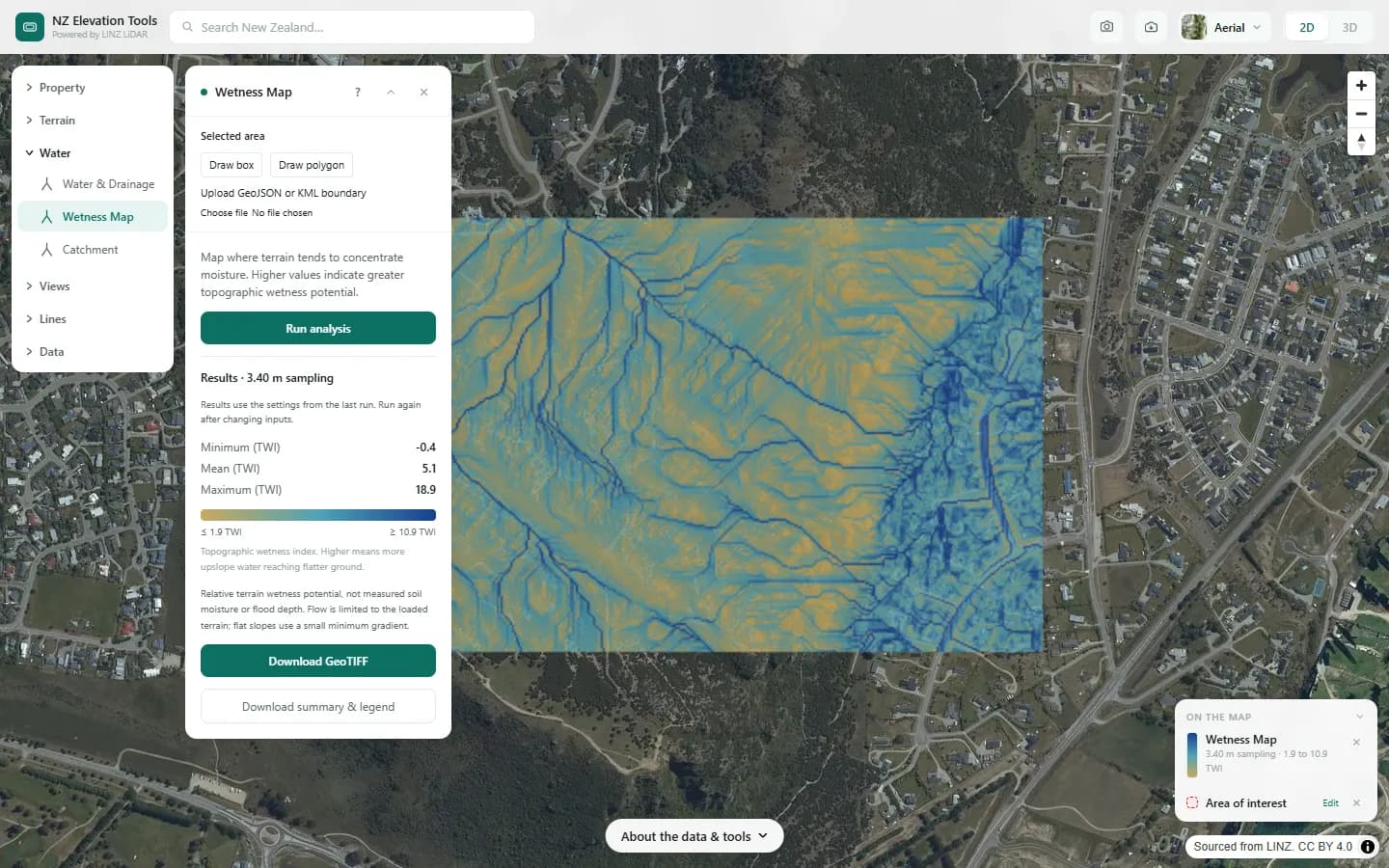
- Run. Tan is dry ground; deep blue is where water collects.
- Read the index range in the panel. The gradient bar and the map legend show the same two end values.
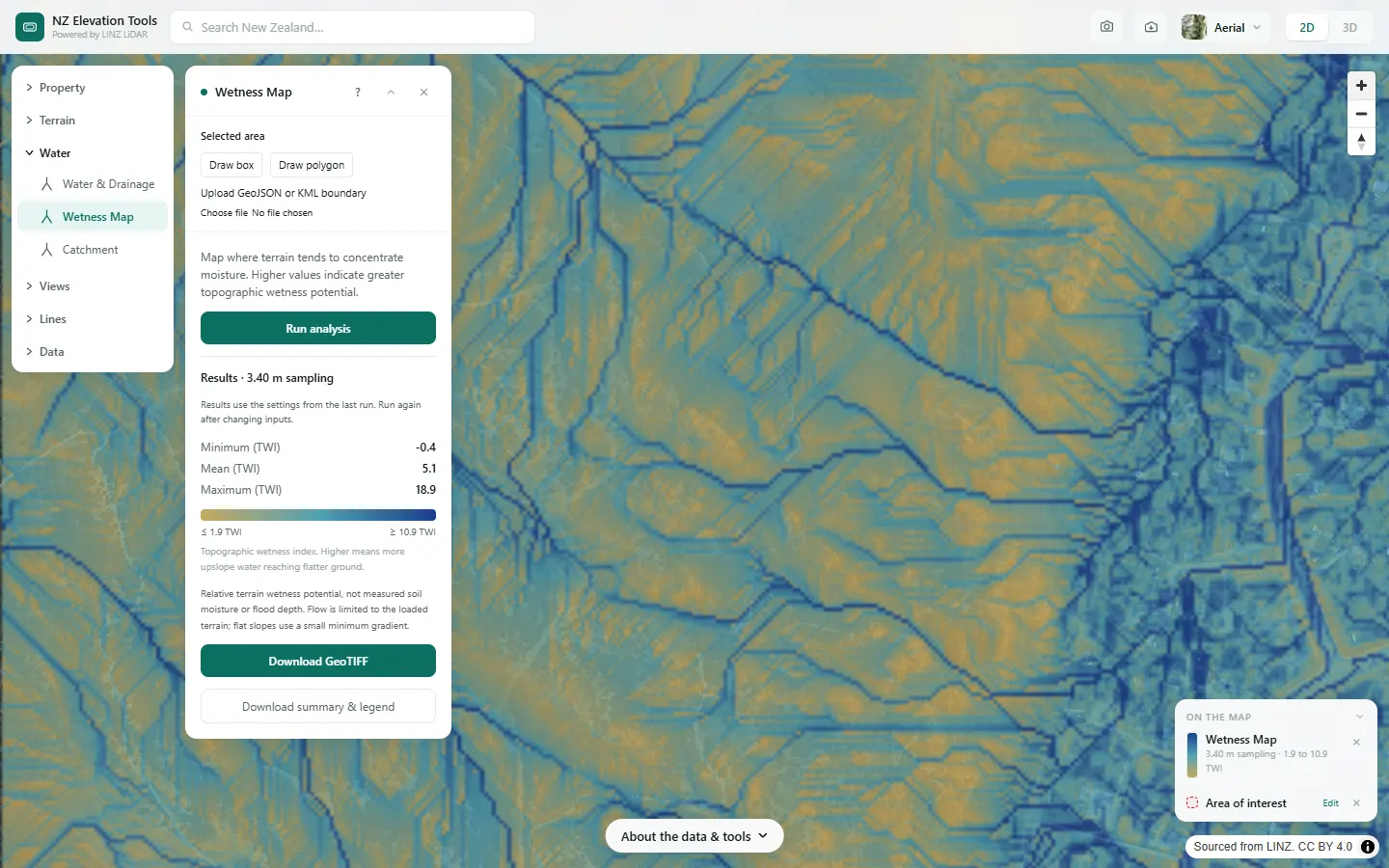
Step by step: Mt Iron, Wānaka
We map which parts of Mt Iron and the land below it tend to stay wet.
What it showed
- The index is relative to this area. Use it to rank the ground within one block, not to compare two places.
Screenshots from NZ Elevation Tools. Aerial imagery from LINZ Basemaps. Sourced from the LINZ Data Service and licensed by Environment Southland, Otago Regional Council and Queenstown-Lakes District Council for re-use under the Creative Commons Attribution 4.0 International licence.
How it works
Water is routed downhill across the LiDAR bare-earth model, with a 1 km buffer loaded around the area so that upstream ground outside the boundary is counted. For each cell the tool takes the area draining into it and divides by the local slope. Lots of upstream area on flat ground gives a high value; a steep ridge with nothing above it gives a low one.
The number is the topographic wetness index, a standard hydrology measure. It is a relative ranking, not a moisture reading.
Reading the results
The colours are stretched between the 2nd and 98th percentile of the area, so the deepest blue is the wettest ground in this area, not a fixed threshold.
Minimum, mean and maximum in the panel are the true extremes; the bar shows where the colours stop changing.
Limits and warnings
- Terrain only. Soil type, water table, drains and tile drainage are not known to the tool.
- Values are comparable within one run, not between different areas or dates.
- Where 1 m LiDAR has not been flown the tool falls back to the national 8 m elevation model, and the result says what share came from the fallback. The 8 m model was interpolated from 20 m map contours and is not fit for site-scale decisions.
Data and attribution
Results come from the LINZ national 1 m LiDAR bare-earth elevation model, read in your browser, with the national 8 m model filling any gaps. Tools that use the surface model (Sunlight, Viewshed, Object Heights) read the matching LiDAR surface tiles.
Elevation and cadastral data is sourced from the LINZ Data Service and licensed for re-use under the Creative Commons Attribution 4.0 International licence. Copyright in each LiDAR survey belongs to the body that commissioned it — a regional or district council, Waka Kotahi, NIWA and around thirty others — rather than to LINZ, which hosts and processes the national dataset. Every file exported from this site names the licensors whose surveys cover the area, and anything you publish from those files carries the same attribution requirement. See https://www.linz.govt.nz/products-services/data/licensing-and-using-data/attributing-elevation-or-aerial-imagery-data
Questions
Is it a soil moisture reading?
No. It is a relative ranking from terrain shape alone. Soil type, water table and existing drains are not known to the tool.
Ready to try it?
Open Wetness Map on the map →Free to use, no account. Runs in your browser on LINZ open data. Downloading the results needs a pass: see prices.