Views · Click a point
Viewshed analysis: what can you see from your property?
Run a viewshed analysis online for any point in New Zealand: the tool shows all the ground visible from there within 1 to 10 km, for the eye height you set, allowing for earth curvature and refraction. With the LiDAR surface option, trees and buildings block the view too.
It answers the view from my property question both ways: what a house site or deck will look at, and who will be able to see it.
Free to run · pay to download
See the full result on the map free, with no account. Download the visibility grid as a GeoTIFF with a pass: NZ$49 for 7 days or NZ$299 for 12 months, one-off, GST included, not a subscription. Every download on the site is included while the pass lasts.
Who uses this
- Buyers. Check the view a site really has, and whether it is at risk.
- Planners and architects. Assess the visibility of a proposed building from roads and neighbours.
- Radio and security installers. Site a repeater, a camera or a wireless link.
When to use it
- Checking what a house site, a deck or a lookout will see, and what will see it.
- Siting a camera, a repeater, a wireless link or a security light.
- Assessing whether a proposed building will be visible from a road or a neighbour.
Which tool for your job
Viewshed is one step in a bigger question. These are the jobs it helps with, and the tools that go with it.
If you’re working on choosing a house site
Where on this block should the house go?
- 1.Find Matching Areas — Narrows the block to the patches that are flat, sunny and facing the right way.
- 2.Slope & Aspect — Shows where the ground is easy to build on and where retaining will be needed.
- 3.Sunlight — Checks winter sun on the candidate platform, hour by hour.
- 4.Cut & Fill — Estimates the earthworks to level the platform before you ask for quotes.
- 5.Viewshed (this tool) — Shows what the house will see and who will see it.
If you’re working on views, privacy and line of sight
What can I see from here, and what can see me?
- 1.Viewshed (this tool) — All the ground visible from one point, out to 10 km.
- 2.Sightline — Whether one point can see another, and where the view is blocked. Good for wireless links and cameras.
- 3.Object Heights — How tall the trees and buildings in the way are.
How to use it
- Open Viewshed and click the observer point.
- Set the eye height above ground, the target height (0 for the ground itself, or the height of a thing you want to see), and the range.
- Choose bare ground, or the LiDAR surface so trees and buildings block the view.
- Run. Visible ground is highlighted; hidden ground is left clear.
- Download the visibility grid as a GeoTIFF for GIS. Downloading needs a pass.
Step by step: Mt Iron, Wānaka
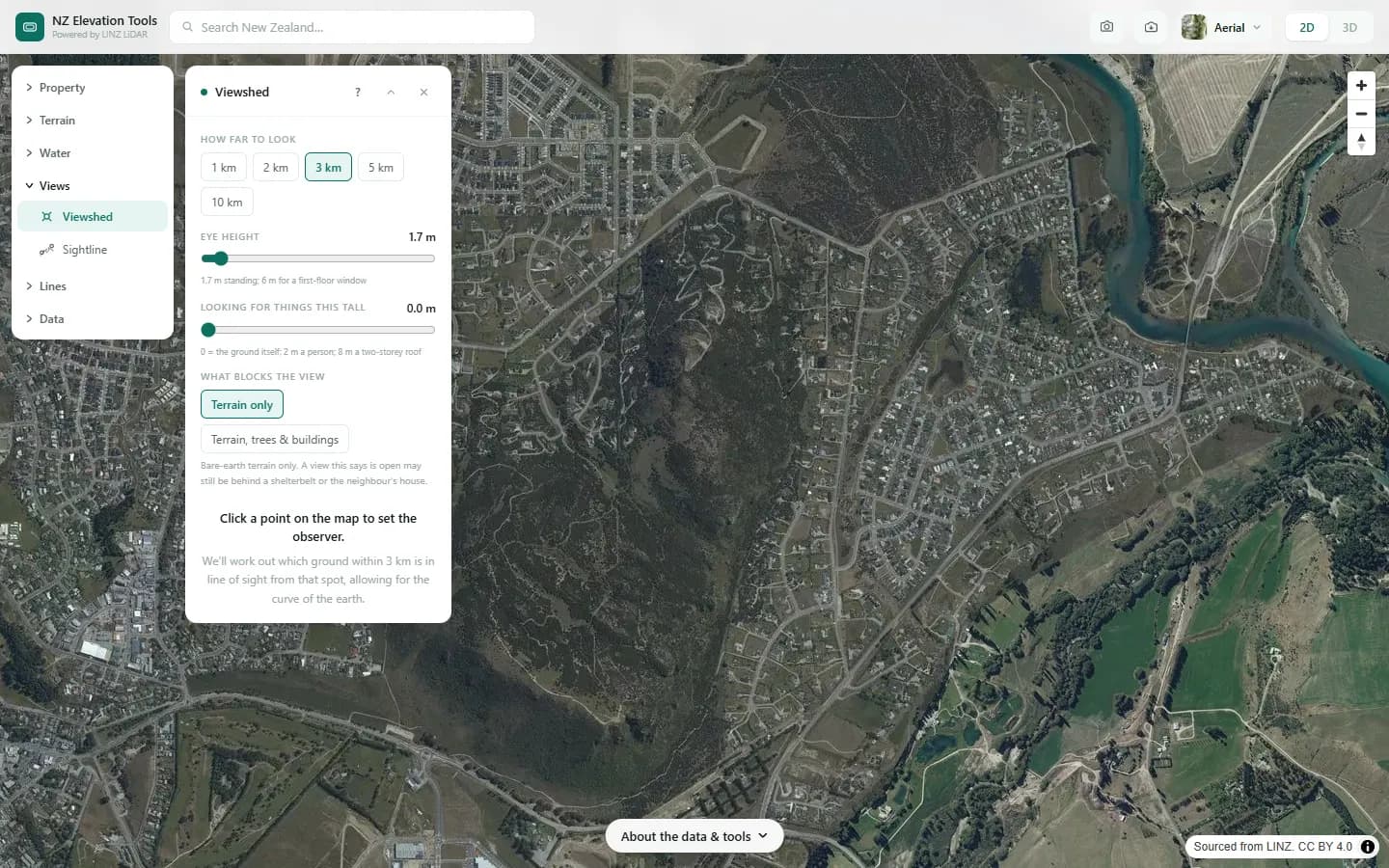
We check what can be seen from near the top of Mt Iron, standing at eye height.
What it showed
- To see where a new house would be visible from, put the point on the house and set the eye height to its roof.
- Choose terrain, trees and buildings to let the LiDAR surface block the view as well.
Screenshots from NZ Elevation Tools. Aerial imagery from LINZ Basemaps. Sourced from the LINZ Data Service and licensed by Environment Southland, Otago Regional Council and Queenstown-Lakes District Council for re-use under the Creative Commons Attribution 4.0 International licence.
How it works
From the observer, rays are cast across the terrain in every direction. Along each ray the tool tracks the steepest angle seen so far; any cell that falls below that angle is hidden behind something nearer. The earth's curvature and standard atmospheric refraction lower distant ground slightly, as they do in reality.
Reading the results
Visible means a straight line exists from the eye to that cell at the target height. It says nothing about how clearly, or whether haze or a window frame intervenes.
Raise the target height to answer "can I see a two-storey house there" rather than "can I see the ground".
Limits and warnings
- Range up to 10 km. Distant views beyond that are not tested.
- With bare ground, shelterbelts and buildings do not block the view. With the surface model they do, but only as they stood on the LiDAR capture date.
- Where 1 m LiDAR has not been flown the tool falls back to the national 8 m elevation model, and the result says what share came from the fallback. The 8 m model was interpolated from 20 m map contours and is not fit for site-scale decisions.
Data and attribution
Results come from the LINZ national 1 m LiDAR bare-earth elevation model, read in your browser, with the national 8 m model filling any gaps. Tools that use the surface model (Sunlight, Viewshed, Object Heights) read the matching LiDAR surface tiles.
Elevation and cadastral data is sourced from the LINZ Data Service and licensed for re-use under the Creative Commons Attribution 4.0 International licence. Copyright in each LiDAR survey belongs to the body that commissioned it — a regional or district council, Waka Kotahi, NIWA and around thirty others — rather than to LINZ, which hosts and processes the national dataset. Every file exported from this site names the licensors whose surveys cover the area, and anything you publish from those files carries the same attribution requirement. See https://www.linz.govt.nz/products-services/data/licensing-and-using-data/attributing-elevation-or-aerial-imagery-data
Questions
Will a new building block my view?
Use Sightline for one line of sight, or raise the target height in Viewshed to see whether a building of that height at that spot would be visible from your point.
Ready to try it?
Open Viewshed on the map →Free to use, no account. Runs in your browser on LINZ open data. Downloading the results needs a pass: see prices.