Property · Select a property, draw a box or polygon, or upload a boundary
Find the best house site on your land
To find the best house site on your land, this tool tests every square metre of the block against the conditions that matter at once: slope, the direction it faces, winter sun, wetness and room for a platform. Only the ground that passes every test is highlighted.
It screens a large rural property down to the few places worth walking, then hands the best patch to Cut & Fill, Sunlight or a property report. Presets cover a house site, solar panels, an orchard or vineyard block, an effluent field and a shed pad.
Free to run · pay to download
See the full result on the map free, with no account. Download the matching-ground map as a GeoTIFF with a pass: NZ$49 for 7 days or NZ$299 for 12 months, one-off, GST included, not a subscription. Every download on the site is included while the pass lasts.
Who uses this
- Rural and lifestyle-block owners. Decide where the house, shed or glasshouse should go.
- Buyers. Check that a large block actually has a buildable, sunny platform on it.
- Designers and solar installers. Short-list candidate sites before a site visit.
When to use it
- Finding candidate house sites or building platforms on a rural block.
- Locating flat, sunny ground for a shed, a glasshouse, an orchard block or solar panels.
- Screening a large property down to the few places worth walking.
Which tool for your job
Find Matching Areas is one step in a bigger question. These are the jobs it helps with, and the tools that go with it.
If you’re working on solar panels and sun
Where will panels, a glasshouse or a deck get the most sun?
- 1.Sunlight — Hours of direct sun on any date, with terrain shadows from up to 3 km away. Start with the shortest day.
- 2.Slope & Aspect — The aspect view shows which faces point north, and the slope view how steep the mounting ground is.
- 3.Find Matching Areas (this tool) — Highlights the ground that is flat enough, faces the right way and clears a minimum of winter sun, all at once.
- 4.Object Heights — Tree and building heights, to spot shelterbelts that will shade the array.
If you’re working on choosing a house site
Where on this block should the house go?
- 1.Find Matching Areas (this tool) — Narrows the block to the patches that are flat, sunny and facing the right way.
- 2.Slope & Aspect — Shows where the ground is easy to build on and where retaining will be needed.
- 3.Sunlight — Checks winter sun on the candidate platform, hour by hour.
- 4.Cut & Fill — Estimates the earthworks to level the platform before you ask for quotes.
- 5.Viewshed — Shows what the house will see and who will see it.
How to use it
- Select a property, draw an area or upload a boundary.
- Pick a starting point (House site, Solar panels, Orchard or vineyard, Effluent field, Shed pad) or set the conditions yourself.
- Adjust the numbers. The first three conditions are always on; wetness and room to build are under More conditions.
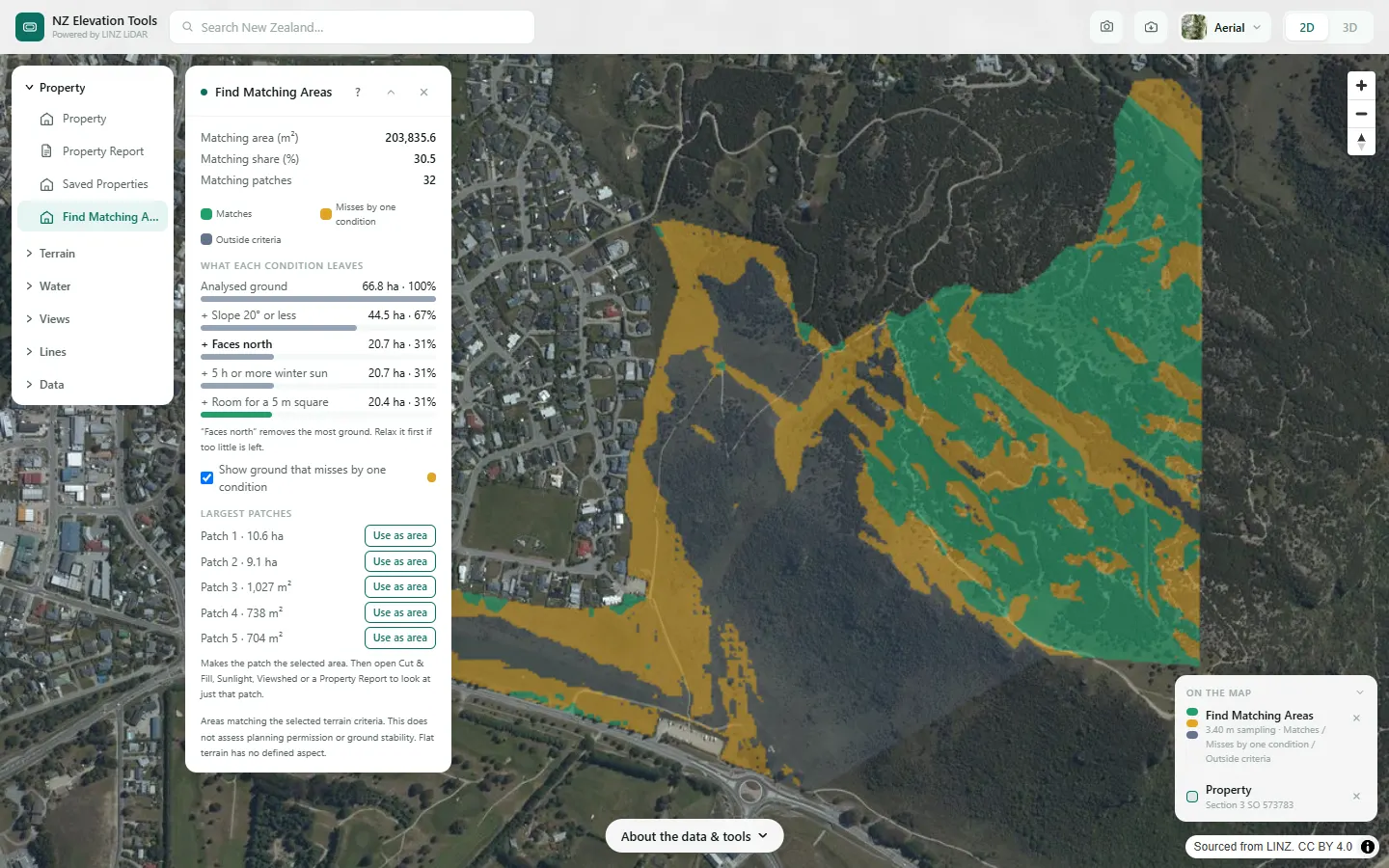
- Run analysis. Matching ground is green, everything else grey. The panel shows how much ground each condition removed.
- Choose Use as area on a patch, then open Cut & Fill, Sunlight, Viewshed or a Property Report to look at just that patch.
Step by step: Mt Iron, Wānaka
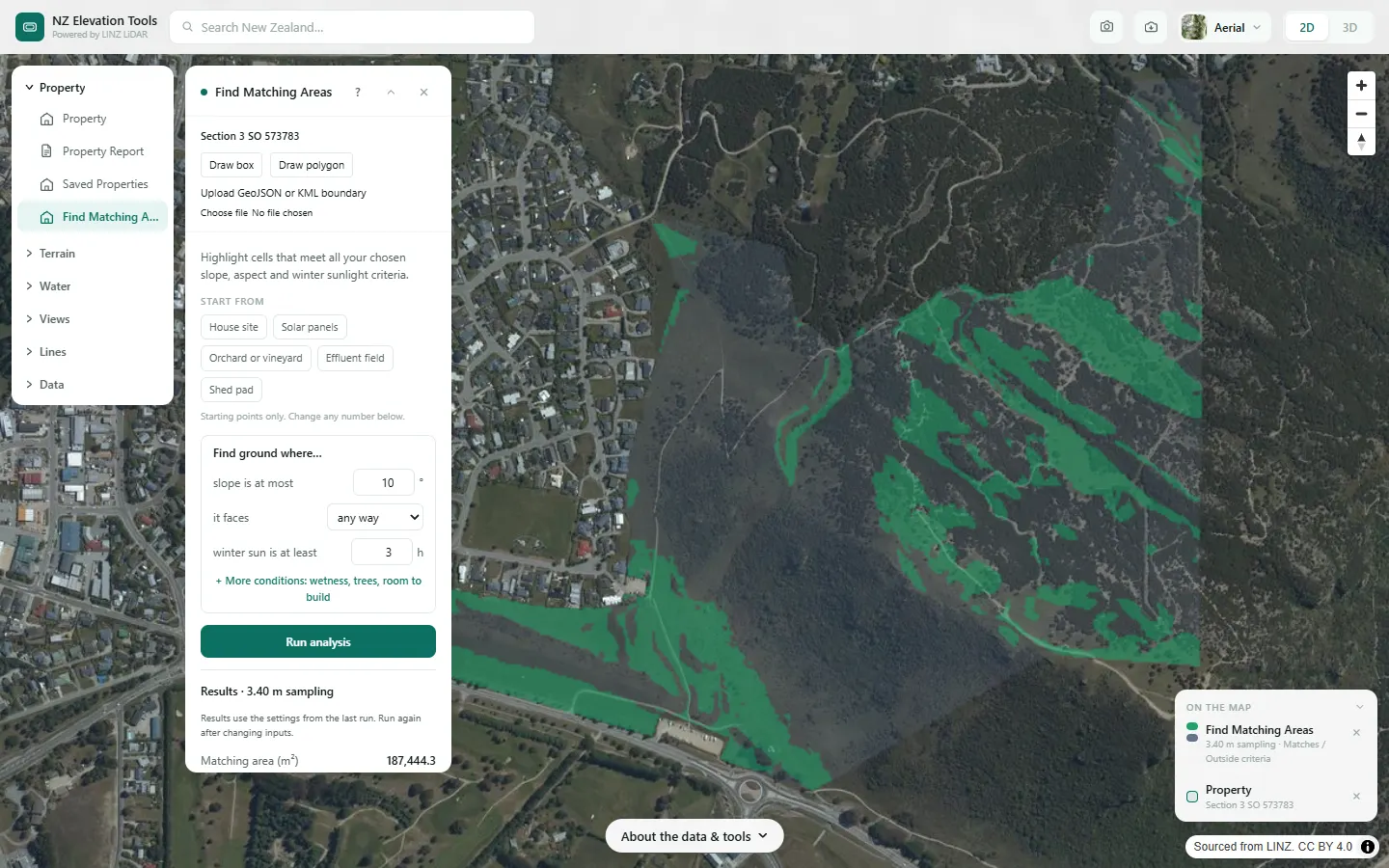
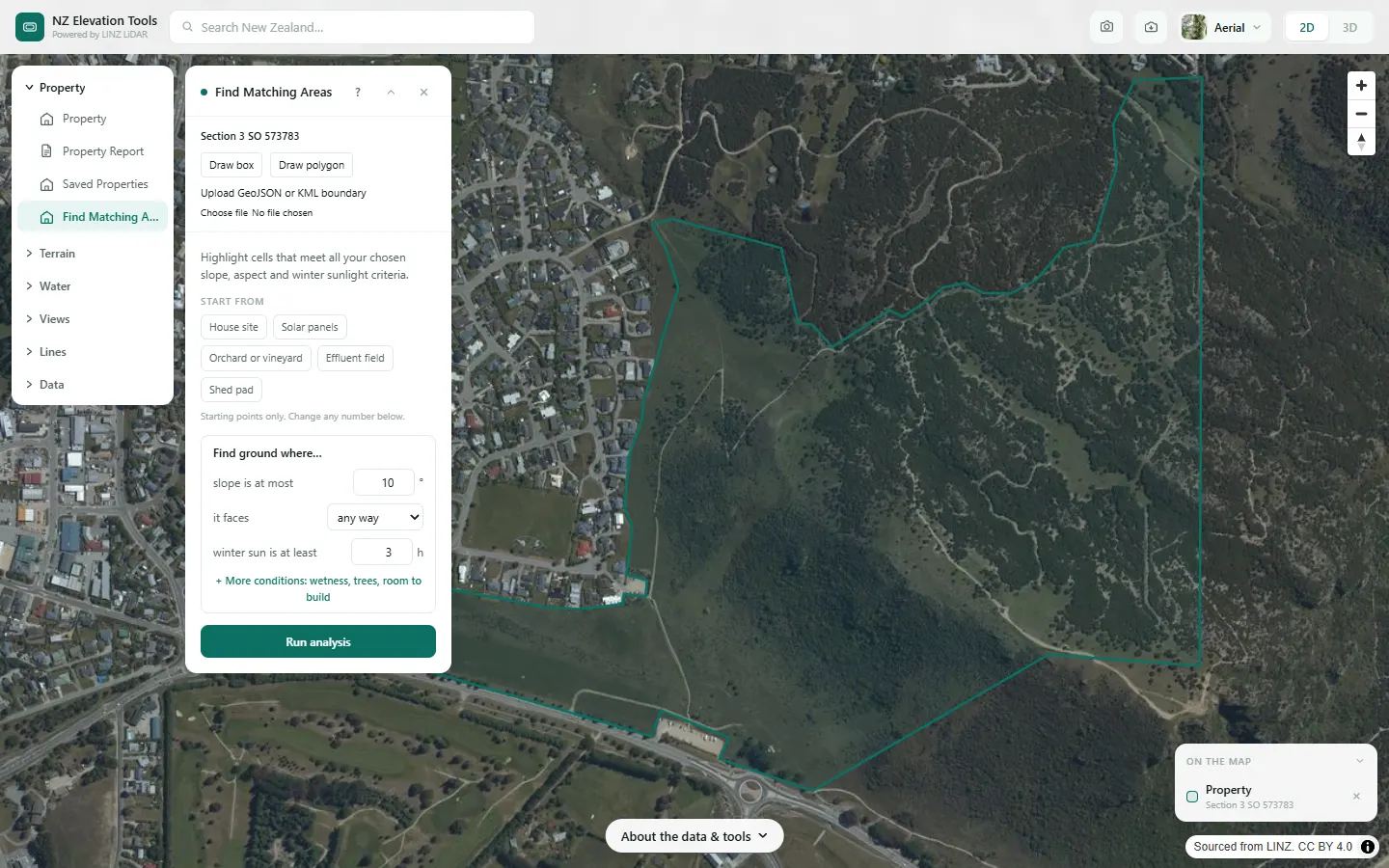
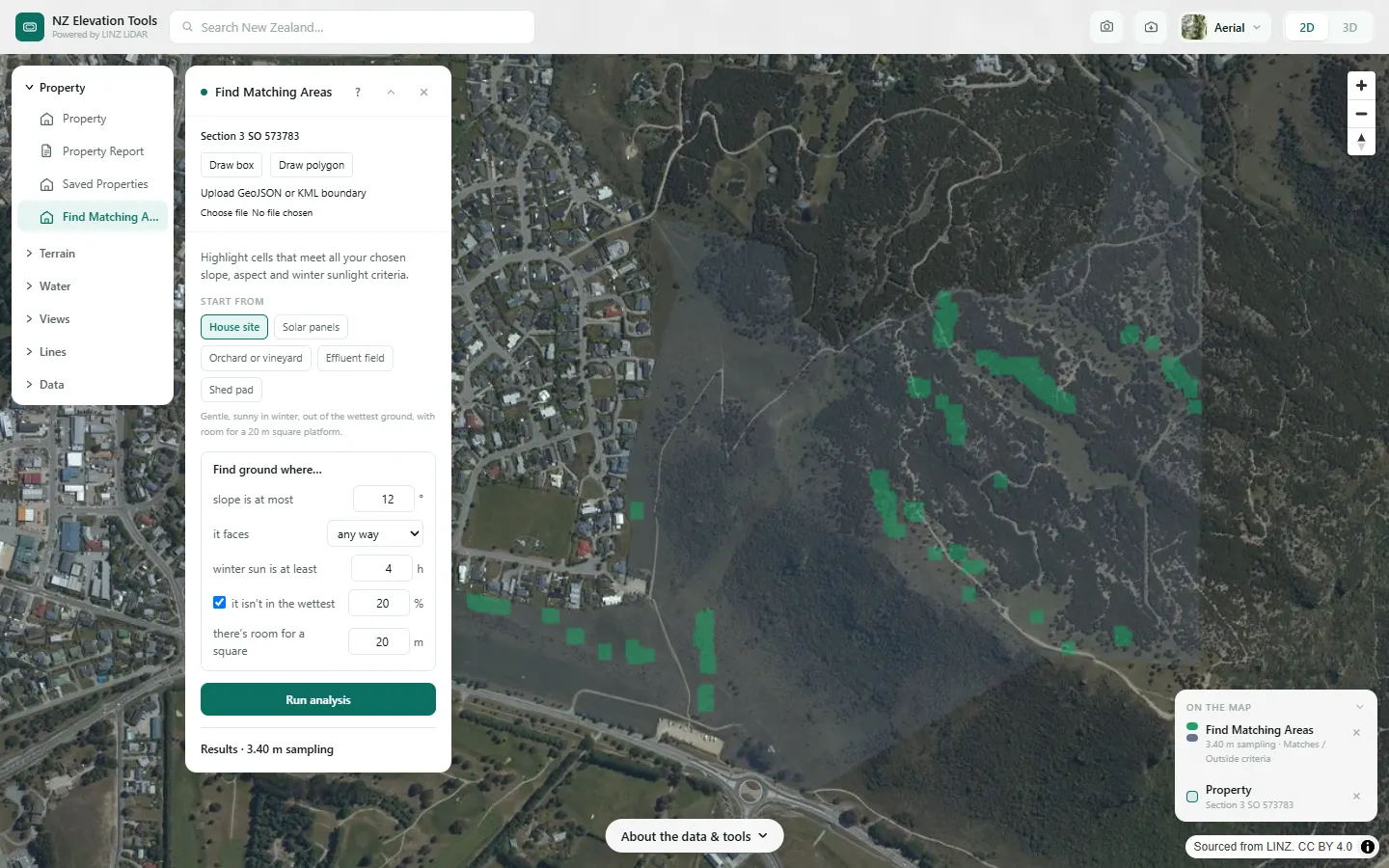
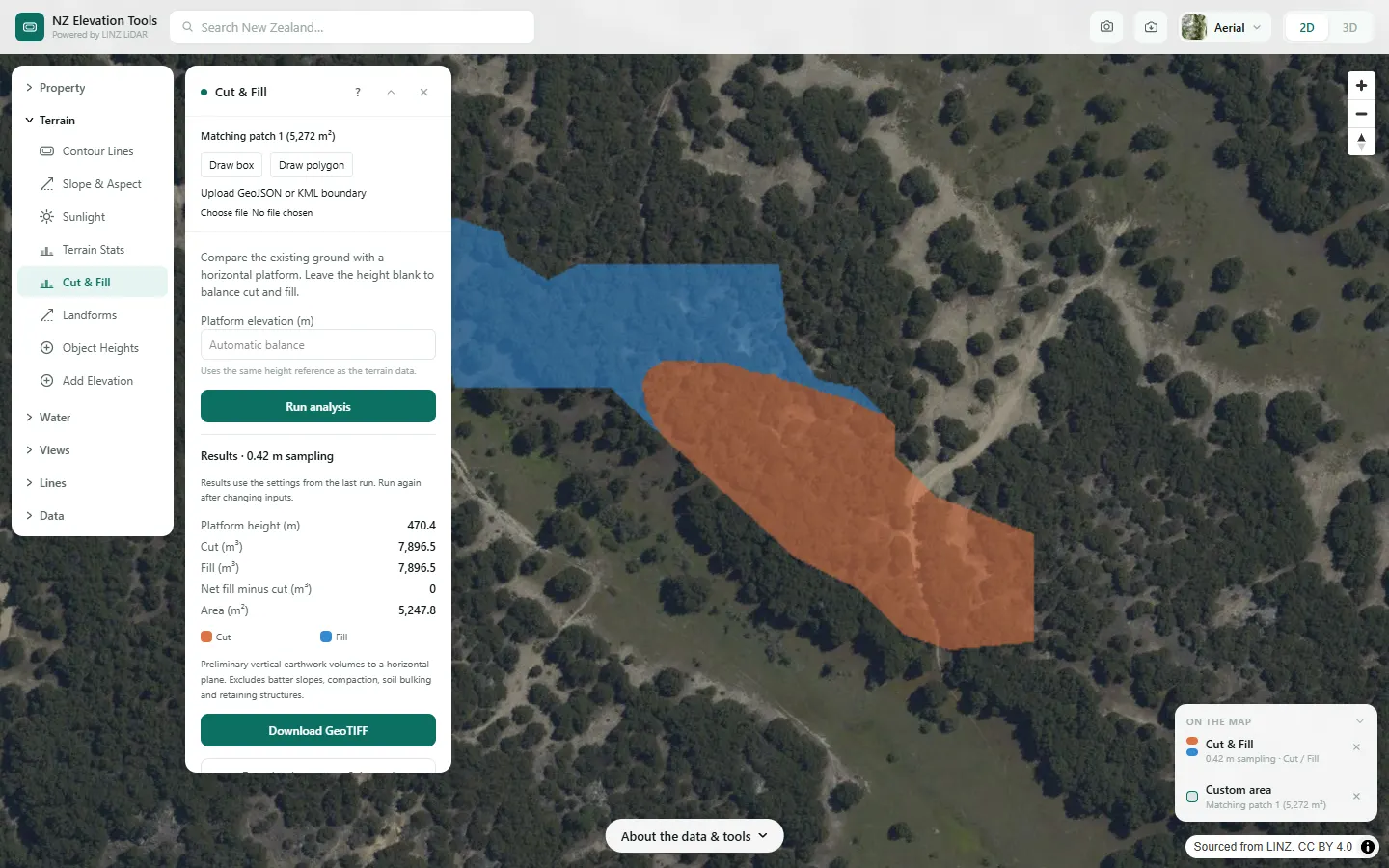
We look for ground inside the Mt Iron reserve that is gentle enough to build on and still gets winter sun, then narrow it to real house sites and size the earthworks on the best one.
What it showed
- The funnel shows which condition does the damage. Slope removes the most, and the platform test then cuts what is left from 24 % to 5 %: there is gentle, sunny ground, but little of it stays gentle over a whole 20 m square.
- Use as area is the link between tools: find the spot with one, then size it, check its sun or view with the next.
- This is a terrain filter. Zoning, access, services and ground stability are separate questions.
Screenshots from NZ Elevation Tools. Aerial imagery from LINZ Basemaps. Sourced from the LINZ Data Service and licensed by Environment Southland, Otago Regional Council and Queenstown-Lakes District Council for re-use under the Creative Commons Attribution 4.0 International licence.
How it works
Every cell of the 1 m LiDAR bare-earth model is tested. Slope and facing direction come from the terrain; direct sun hours are modelled for 21 June by tracing the sun and checking whether terrain up to 3 km away blocks it.
Wetness uses the same topographic wetness index as the Wetness Map, ranked within your area, so "not in the wettest 20 %" leaves out the fifth of the ground where the shape of the land gathers the most water.
Room to build keeps only ground where a square platform of the chosen width fits with every cell inside it passing. A long thin strip can pass every other test and still have nowhere to put a house; this removes it.
A cell matches only when every active test passes. Flat ground has no facing direction, so it only passes that test when any way is chosen.
Reading the results
What each condition leaves lists the ground remaining after each test in turn. The condition that removes the most is highlighted: relax that one first if too little is left.
Show ground that misses by one condition adds amber for ground that fails exactly one test, which is where a small change would add the most.
Largest patches lists the five biggest matching patches. Use as area makes one of them the selected area for any other tool.
Winter sun is modelled on bare ground, so a patch shaded by a shelterbelt or a neighbour’s house can still show as sunny.
Limits and warnings
- Terrain criteria only. Not a check of zoning, setbacks, geotechnical stability, access, services or flood hazard.
- Presets are starting points, not rules. Check them against your own plans and the council’s.
- Areas up to 12 km across. Larger areas are sampled more coarsely, so small platforms can disappear; select a smaller area for detail.
- Where 1 m LiDAR has not been flown the tool falls back to the national 8 m elevation model, and the result says what share came from the fallback. The 8 m model was interpolated from 20 m map contours and is not fit for site-scale decisions.
Data and attribution
Results come from the LINZ national 1 m LiDAR bare-earth elevation model, read in your browser, with the national 8 m model filling any gaps. Tools that use the surface model (Sunlight, Viewshed, Object Heights) read the matching LiDAR surface tiles.
Elevation and cadastral data is sourced from the LINZ Data Service and licensed for re-use under the Creative Commons Attribution 4.0 International licence. Copyright in each LiDAR survey belongs to the body that commissioned it — a regional or district council, Waka Kotahi, NIWA and around thirty others — rather than to LINZ, which hosts and processes the national dataset. Every file exported from this site names the licensors whose surveys cover the area, and anything you publish from those files carries the same attribution requirement. See https://www.linz.govt.nz/products-services/data/licensing-and-using-data/attributing-elevation-or-aerial-imagery-data
Questions
Does it check zoning or setbacks?
No. It is terrain only: slope, aspect, sun, wetness and room to build. Zoning, setbacks, access, services, flood hazard and ground stability have to be checked with the council and the relevant professionals.
What does it assume about winter sun?
Direct sun on 21 June, with shadows from terrain up to 3 km away. Trees and buildings are not counted in this tool, so a patch behind a shelterbelt can still show as sunny.
Ready to try it?
Open Find Matching Areas on the map →Free to use, no account. Runs in your browser on LINZ open data. Downloading the results needs a pass: see prices.